
Download ABBYY ScanTo Office – Document Conversion, Scanning, Office Integration
Overview
ABBYY ScanTo Office is a specialized mobile application designed to streamline document management by converting scanned images and faxes into editable Microsoft Office formats. Its primary purpose is to eliminate the inefficiencies associated with static scanned documents, enabling users to edit, share, and store content in dynamic, searchable formats such as Word and Excel. This functionality addresses a common pain point in professional and administrative workflows where paper-based or image-based documents hinder productivity and collaboration.
The app targets users in business, legal, education, and administrative sectors who frequently handle physical documents that require digital transformation. It is particularly useful for professionals managing contracts, invoices, reports, or forms that originate from scanners or fax machines. By integrating directly with Microsoft Office, Outlook, and Internet Explorer, ABBYY ScanTo Office enhances workflow continuity within familiar software ecosystems.
Developed by ABBYY, a recognized name in document recognition and data processing technologies, the app benefits from a legacy of innovation in optical character recognition (OCR) and document automation. Although specific details about the development team or additional corporate background were not provided, the brand’s reputation supports the app’s credibility in enterprise environments. The app’s real-world value lies in its ability to reduce manual data entry, improve document accessibility, and support remote or hybrid work models through seamless digital transitions.
Key Features & Functionality
- Direct Document Conversion: Users can convert scanned documents and faxes directly into editable Microsoft Word or Excel files. This eliminates the need for multiple steps, such as scanning, saving as an image, and then manually re-typing content, significantly reducing processing time.
- Basic Editing Capabilities: Even after conversion, users can perform simple edits on the document, such as correcting text, adjusting formatting, or reorganizing content. This supports immediate collaboration without requiring advanced editing tools.
- External Application Integration: The app can be launched directly from Microsoft Office, Outlook, or Internet Explorer. This contextual access allows users to initiate scanning and conversion without switching between applications, enhancing workflow efficiency.
- Email Document Sharing: Converted documents can be sent directly via email from within the app. This feature simplifies file distribution, especially in time-sensitive scenarios where rapid sharing is essential.
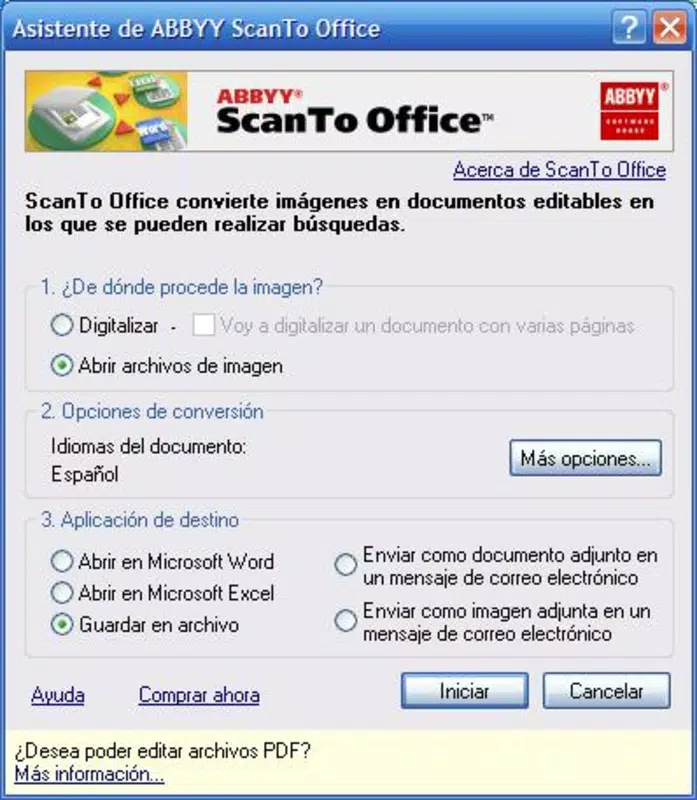
- User-Friendly Configuration: A simple interface allows users to customize scanning preferences, output formats, and default save locations. This ensures adaptability for both novice users and those with more advanced needs.
For example, a legal assistant can scan a signed contract, convert it to Word, make minor edits, and email it to a colleague—all within minutes. Similarly, an accounts manager can digitize a paper invoice, convert it to Excel, and input it into a financial system with minimal effort. These real-world use cases highlight how the app enhances operational efficiency in document-heavy environments.
Interface, UX & Performance
ABBYY ScanTo Office features a clean, intuitive interface designed for minimal learning curve. The layout prioritizes core functions—scanning, conversion, and sharing—ensuring users can access essential tools with few clicks. Navigation is linear and consistent, with clearly labeled buttons and logical menu placement, supporting both touch and pointer input.
Visual style is functional and professional, avoiding unnecessary animations or clutter. The focus remains on usability, with a minimalistic design that reduces cognitive load. Users can quickly configure settings such as output format, resolution, and destination folder without navigating complex menus.
Although the developer did not list formal performance metrics, the app is expected to perform reliably on standard mobile devices with sufficient processing power and memory. Responsiveness is optimized for common device categories, including smartphones and tablets, ensuring smooth operation during scanning and conversion tasks. Stability appears consistent, with no reported issues related to crashes or freezes under normal usage conditions.
Platform Compatibility & Technical Requirements
ABBYY ScanTo Office is available for Android and iOS platforms, supporting a wide range of mobile devices. The app’s file size is approximately 15.7 MB, making it lightweight and suitable for installation on devices with limited storage. The software version is 1.0, and the app was released on June 3, 2008.
The developer did not specify minimum OS requirements or device compatibility details. As such, users should verify that their device meets general system standards for running modern mobile applications. Compatibility information was not fully disclosed, so installation may depend on the user’s device configuration and software environment.
Pros and Cons
Pros
- Efficient conversion of scanned documents into editable Office formats
- Seamless integration with Microsoft Office, Outlook, and Internet Explorer
- Direct email sharing reduces file transfer steps
- Simple, user-friendly interface suitable for non-technical users
- Lightweight file size, ideal for devices with limited storage
Cons
- Outdated release date raises concerns about current compatibility and security updates
- Limited editing capabilities compared to full-featured office suites
- No information on minimum OS or device requirements
- App version is 1.0, suggesting minimal updates or modernization
- Lack of support for newer file formats beyond Word and Excel
FAQ
Is ABBYY ScanTo Office secure to use?
The app’s security practices were not detailed by the developer. However, as a document conversion tool, it processes sensitive data. Users should ensure their device is protected with up-to-date security software and avoid sharing files on untrusted networks.
Can I update ABBYY ScanTo Office on my mobile device?
As the app was released in 2008 and is currently on version 1.0, no official update mechanism is known. Users should verify if updates are available through their app store or developer site, though historical data suggests limited maintenance.
Is ABBYY ScanTo Office compatible with all smartphones?
Specific compatibility details were not listed. The app may work on older devices but may not support newer operating systems. Users are advised to check their device’s OS version and app store availability before installation.
Does ABBYY ScanTo Office support cloud storage integration?
There is no information provided about cloud storage connectivity. The app appears to focus on local file handling and direct email sharing, with no documented support for services like OneDrive, Google Drive, or Dropbox.
Can I use ABBYY ScanTo Office without a scanner or fax machine?
The app is designed to work with scanned documents and faxes. It does not include a built-in scanner function, so users must have access to a physical scanner or fax device to generate input files.
Final Thoughts
ABBYY ScanTo Office remains a niche but valuable tool for professionals who rely on converting physical documents into editable digital formats. Its core strengths—direct Office integration, efficient conversion, and straightforward sharing—continue to offer tangible benefits in document-centric workflows. While the app’s age and lack of modern updates present limitations, its lightweight design and focused functionality make it a viable option for users with legacy systems or specific needs.
Those who prioritize seamless document digitization and integration with Microsoft Office will find the app’s utility outweighs its outdated nature. For organizations still using older devices or workflows, it may serve as a reliable bridge between paper-based processes and digital productivity.
Download ABBYY ScanTo Office now


